Maintenance Tracking runs your due list, work and sign-offs. Records reads every logbook page back to birth. Use either one. With both, every line on your due list opens the page that proves it.
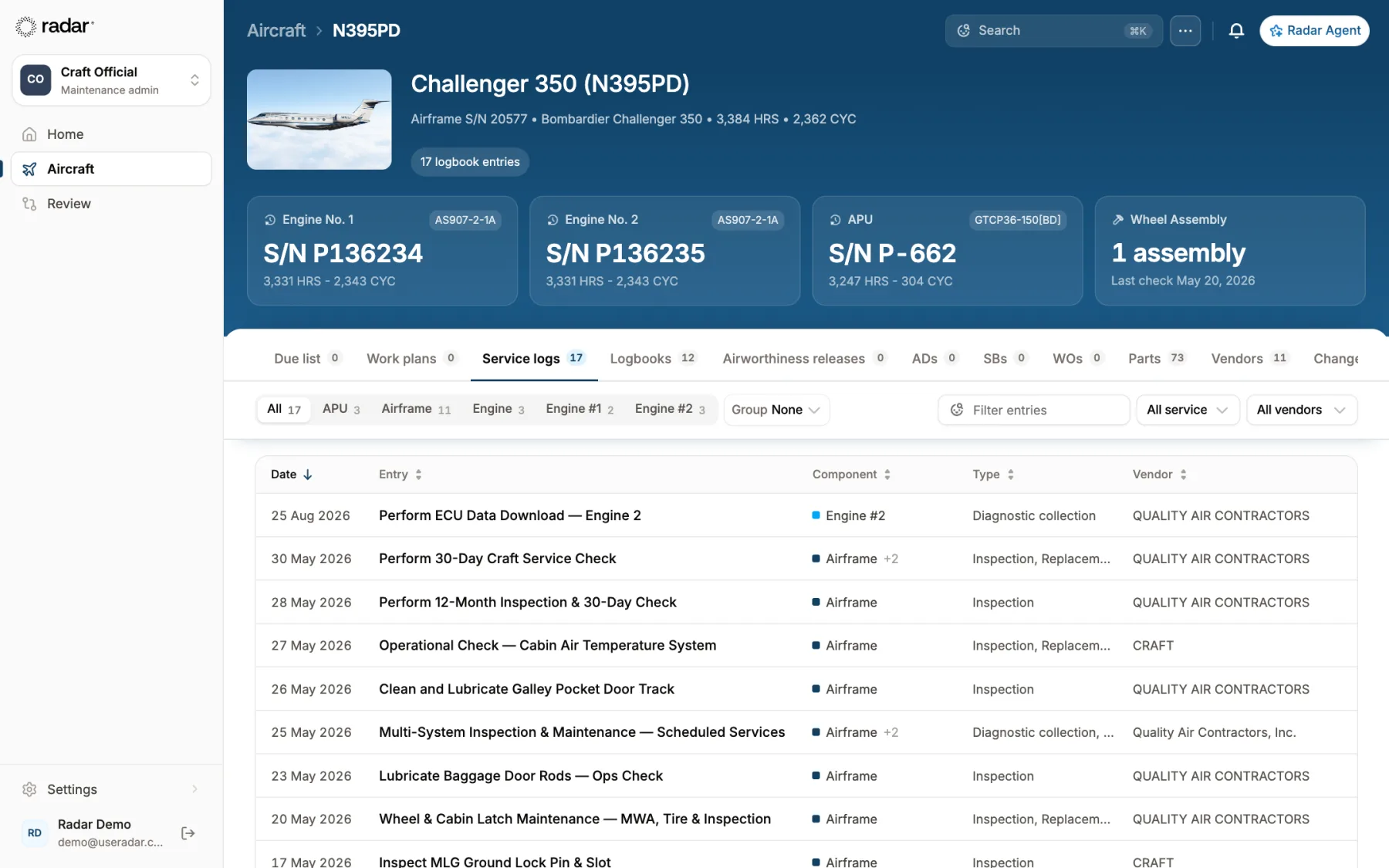
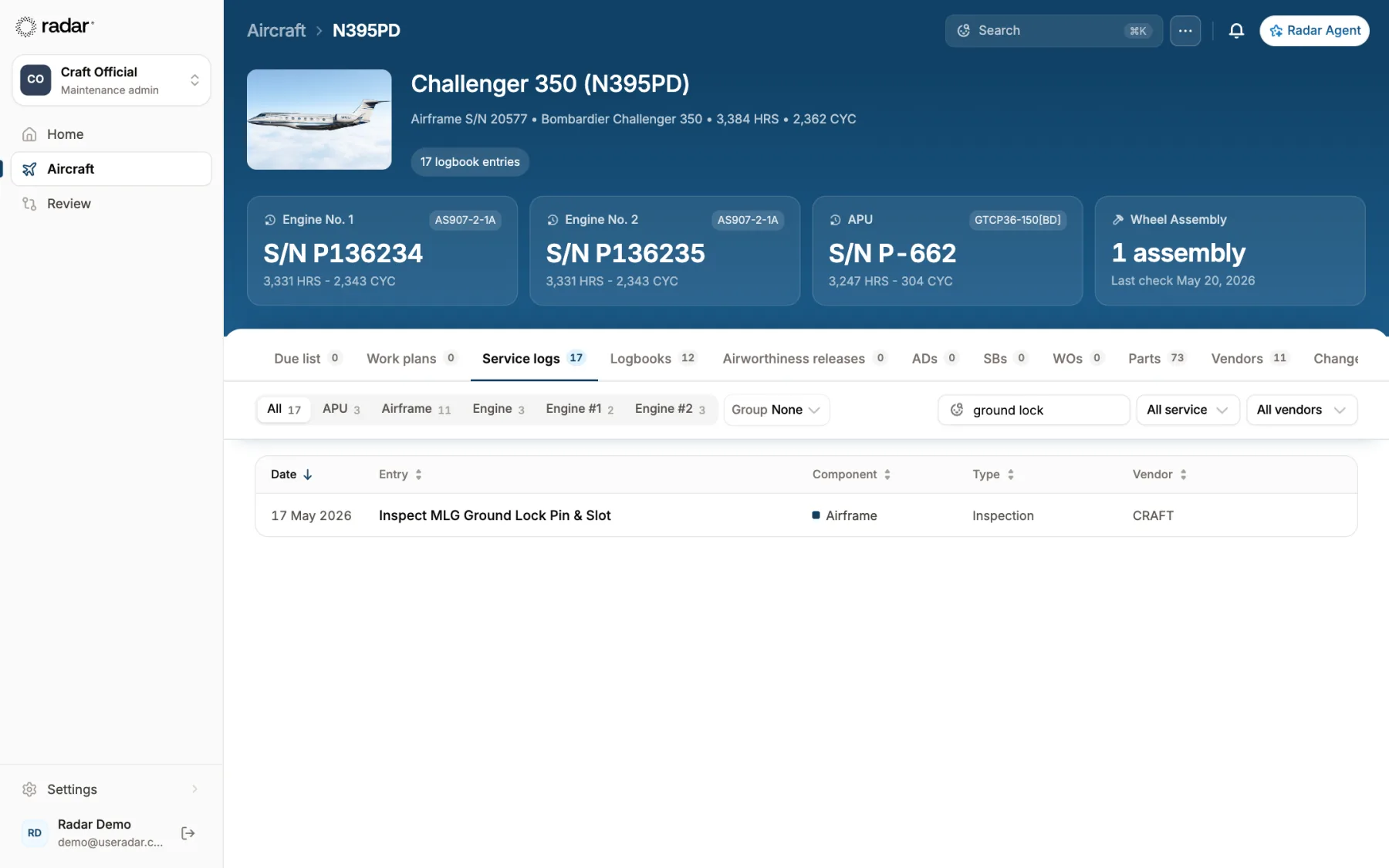
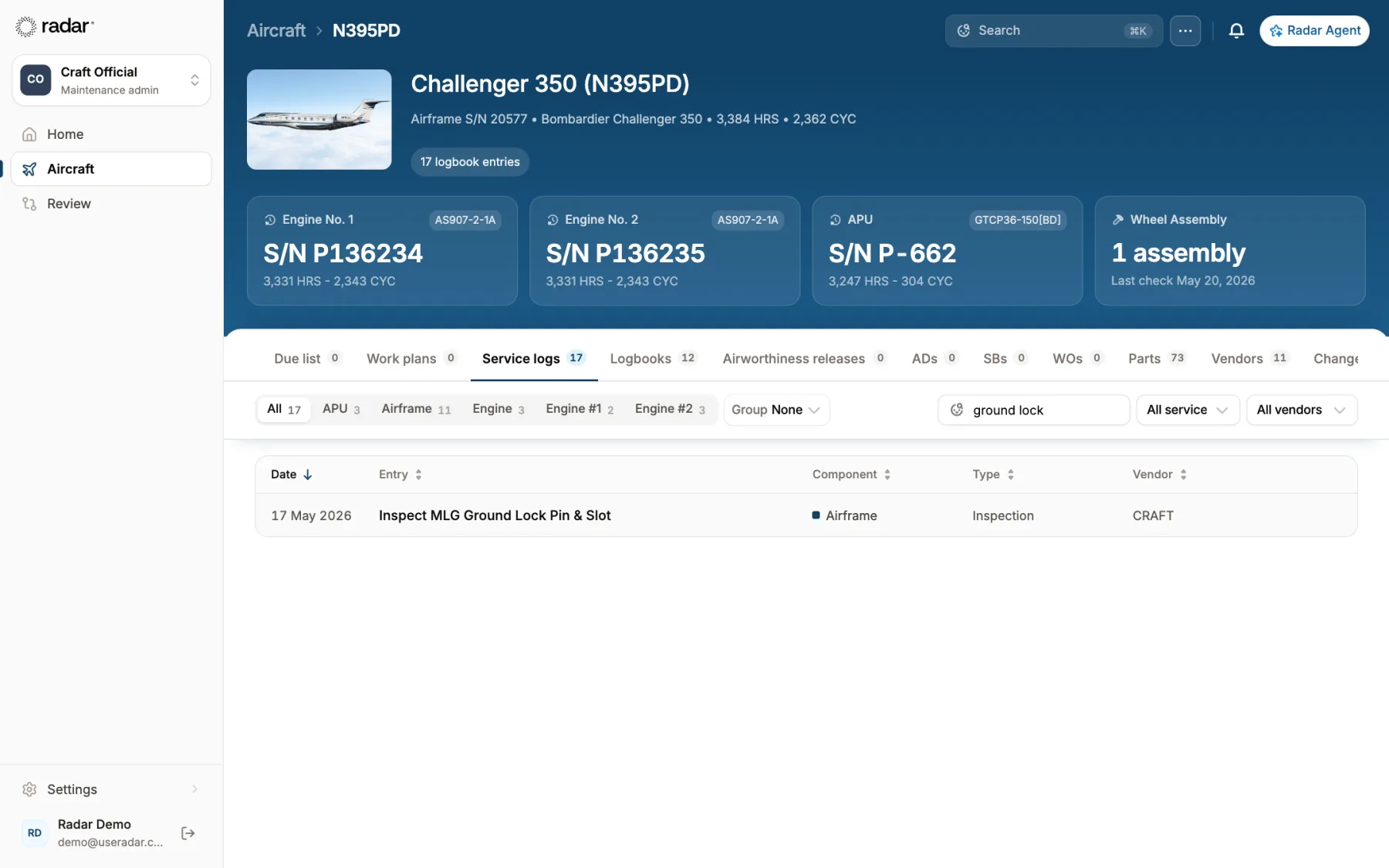
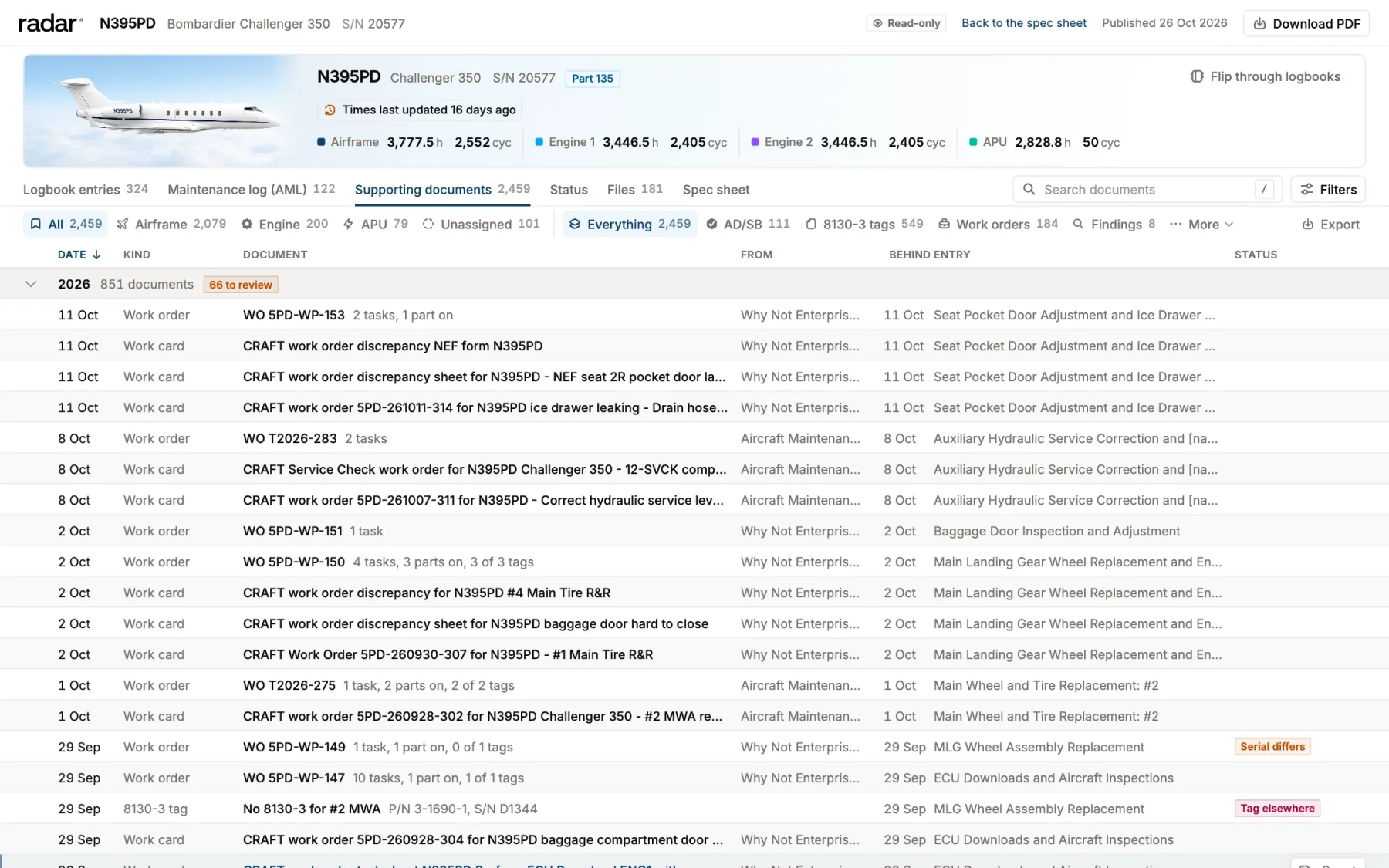
Recorded in the Radar web app on N395PD's public, read-only records.
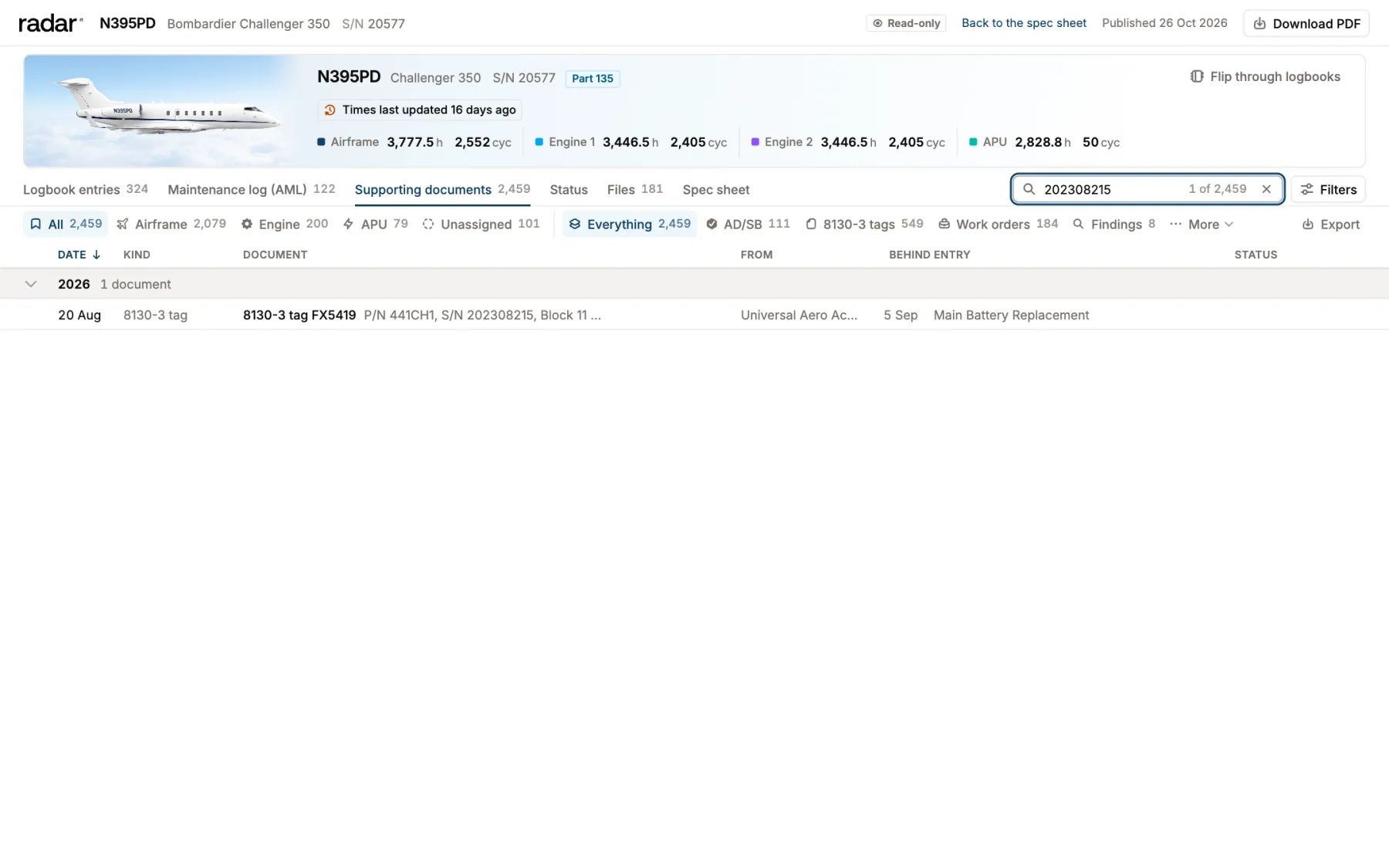
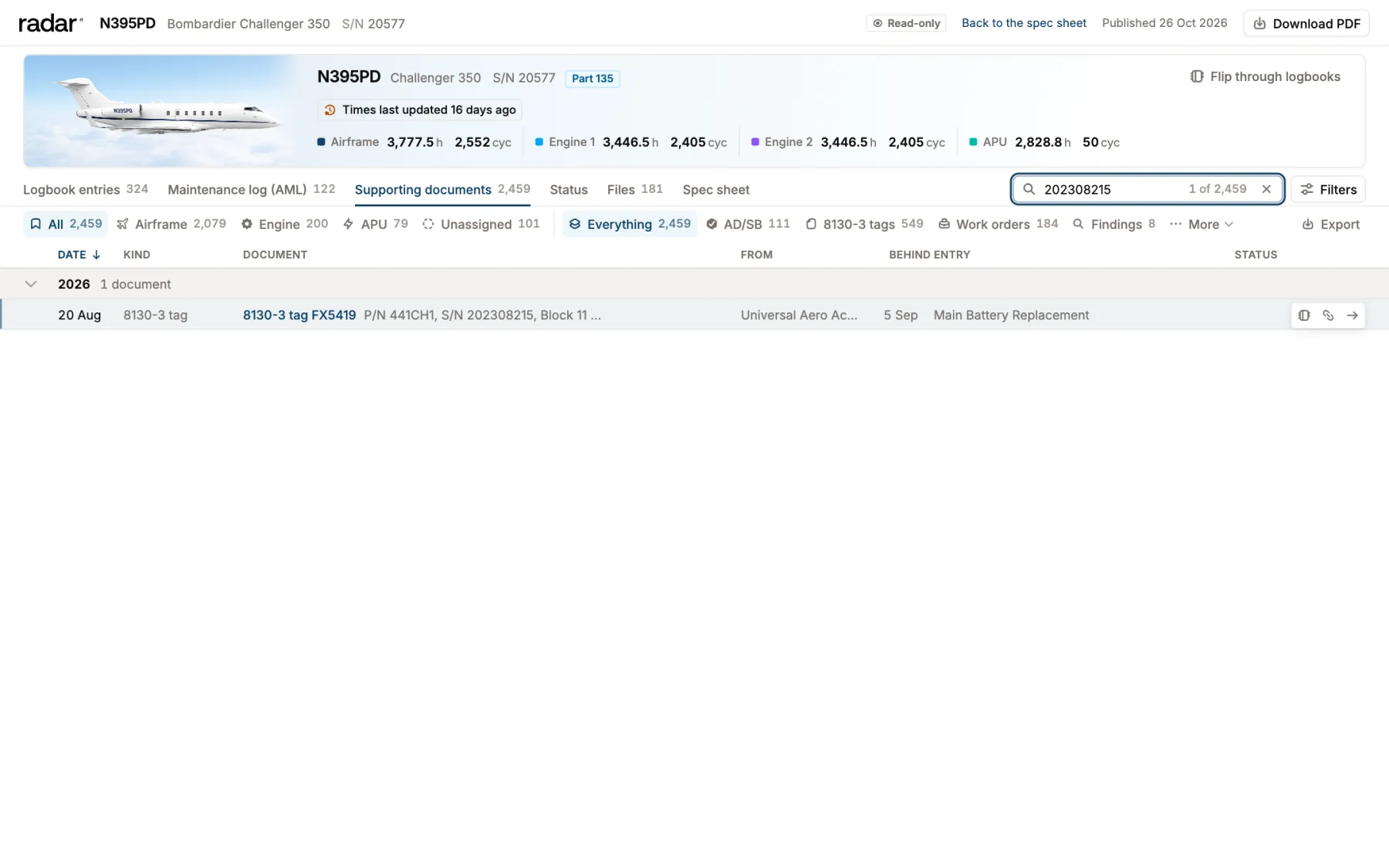
Every entry shows who signed it and the page it came from.Search a serial number to find its 8130-3 tag and install entry.Every number on the spec sheet opens the page it came from.
app.useradar.com
What Radar does
Maintenance Tracking runs the work. Records keeps the proof.
01 Maintenance Tracking
Know what's due.
Your due list, squawks, work plans and sign-offs in one place, with a check before every release.
N724RDDue list · Challenger 350
Airframe 12 month inspection05-20-00
9 daysNear due
Squawk: aft lav flush motorMEL 38-30-01 · Cat C
6 daysDeferred
Engine 1 borescope inspection72-00-00
22 hrsNear due
APU 12 month inspection49-10-00
156 daysIn the green
Emergency light battery packsAD 2021-06-11
308 daysIn the green
Due list from your maintenance programs, or import your Traxxall status report
Squawks with MEL deferral
Technician and inspector sign each task once
Release to service holds on anything unsigned or missing
Every logbook page read back to birth, searchable, with the signed page behind every entry.
1400 SAMPLE WAY, HANGAR 6, WILMINGTON, DE 19804
AIRFRAME MAINTENANCE RECORDWO#:H2026-0412
Registration
Make
Model
Serial Number
Date
N724RD
Bombardier
CL-350
20999
02/AUG/2026
Airframe Time:
5902.7
Airframe CYC:
3771
Location
KILG
Complied with the following:
Matches the tracker05-20-00 12 MONTH INSPECTION AND 30 DAY CHECK COMPLIED WITH IAW CL350 MPM.
Performed all 12 month and 30 day inspection tasks I/A/W BD-100 MPM 05-20-00 and CL350 AMM. No defects noted at this time.
33-51-00-201 FUNCTIONAL CHECK OF THE EMERGENCY LIGHTING BATTERY PACKS.
Performed functional check of the cabin and exit emergency light batteries I/A/W BD-100 AMM 33-51-00. All packs held charge. No defects noted at this time.
29-11-04-201 REPLACED HYDRAULIC SYSTEM 1 AND 2 PRESSURE FILTER ELEMENTS.
Removed and replaced the NO. 1 and NO. 2 hydraulic pressure filter elements I/A/W BD-100 AMM 29-11-04. Performed leak check. Leak check good.
32-41-00-201 GENERAL VISUAL INSPECTION OF THE MLG WHEELS AND BRAKES.
Performed general visual inspection of the MLG wheels, tires and brake assemblies I/A/W BD-100 AMM 32-41-00. Wear pins within limits. No defects noted at this time.
34-11-00-720 PITOT STATIC SYSTEM LEAK CHECK.
Performed pitot static system leak check I/A/W BD-100 AMM 34-11-00 and 14 CFR 91.411 Appendix E. System within limits.
HYD FILTER ELEMENT NO. 1 Removed P/N: AC-B932F-8 S/N: N/A
HYD FILTER ELEMENT NO. 1 Installed P/N: AC-B932F-8 S/N: N/A
HYD FILTER ELEMENT NO. 2 Removed P/N: AC-B932F-8 S/N: N/A
HYD FILTER ELEMENT NO. 2 Installed P/N: AC-B932F-8 S/N: N/A
I certify that the above stated maintenance and/or inspection(s) was performed in accordance with the current FARs and the airframe or engine identified above was found to be in an airworthy condition and is approved for return to service with respect to the work performed. For details of work performed reference customer W.O. N724RD-H2026-0412
Signature:
Name: J. Okafor Certificate Number: A&P 45•11 IA
1
Sample record for illustration
Airframe log, Book 5, page 61 · signed 02 Aug 2026
Ship the binders with prepaid labels, or upload PDFs
$2,400 to $4,800 per aircraft a year, by aircraft size
+ Maintenance Tracking and Records
Better together.
Run both and the due list and the logbooks stay tied together, line by line.
Airframe 12 month inspectionIn the green · next due 02 Aug 2027
Airframe log, Book 5, page 61Signed 02 Aug 2026, J. Okafor, A&P IA
$6,000 to $13,500 per aircraft a year for both, by aircraft size
Every line opens its page.Each item on the due list links to the signed logbook entry that shows it was done.
Set up from the books.Radar suggests each item's last compliance from your logbooks, so you confirm it instead of typing it.
Sign once, logged once.A signed task writes the logbook entry in Records and moves the due list.
Answers with proof.Ask about any inspection or AD and get the page that proves it.
01 · Maintenance Tracking
Know what's due.
Your due list from your maintenance programs, or import your Traxxall status report. Squawks, work plans and sign-offs in one place, and a check before the aircraft goes back into service.
Due list
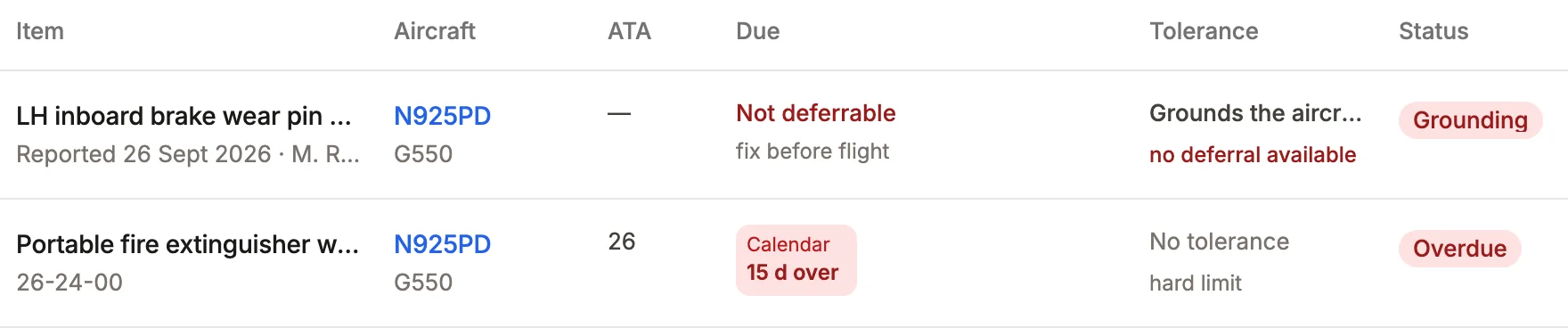
Grounding squawk, no deferral
Due list
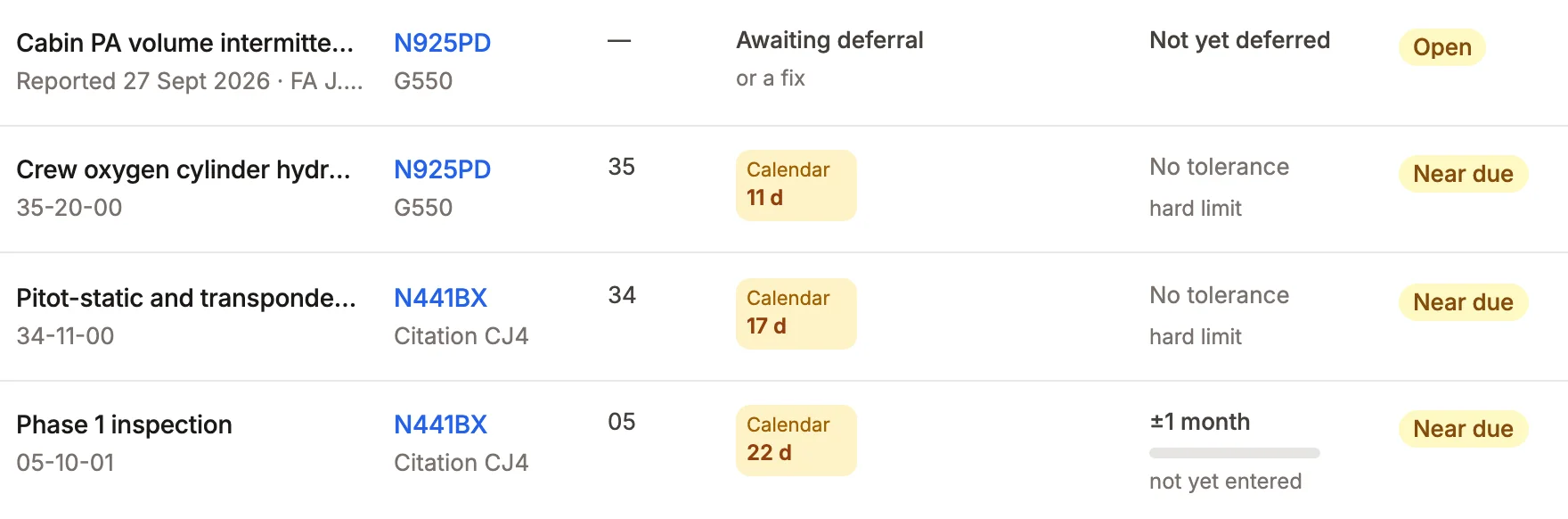
Every inspection, AD and part life from your maintenance programs. Last done comes from the signed entry.
Real Radar screen, sample aircraft.
SquawkDeferred
Aft lavatory flush motor inoperative Reported 28 Sep 2026 by the crew
MEL38-30-01Category C
10days to fix
On the due listMEL C · due 08 Oct 2026
Squawks and MEL deferrals
Log a squawk, defer it under your MEL, and it stays on the due list until it's closed.
Near due · 10 daysIn the green · next due 28 Sept 2031
Sign off work once
The technician and inspector sign each task. That signature writes the logbook entry and updates the due list.
Release to serviceRelease held
Every task recorded
Every task signed off
Document missing: 8130-3
No open findings
8130-3Task 3 · fuel nozzleDocument missing
Release to service
Before the aircraft goes back into service, Radar checks for unsigned tasks, missing paperwork and open findings.
Maintenance Tracking · one shop visit
From the shop to the due list.
Send the shop a work plan. The paperwork that comes back is filed on the task it belongs to. The aircraft isn't released until the paperwork is complete.
The shop's paperwork, filed on each task
Maintenance TrackingOne shop visit, from the work plan to the release
01
The work plan goes out.
Three items coming due become one work plan for the shop and the downtime.
Due list · N724RD
Airframe 12 month inspectionDue in 9 days
Engine 1 borescope inspectionDue in 22 hrs
Squawk: #7 fuel nozzleOpen
Work plan · WP-4
Airframe 12 month and 2 more tasks
Crestline Aero Repair · Oct 6 to 9
1Airframe 12 month inspectionPlanned
2Engine 1 borescope inspectionPlanned
3Replace Engine 2 #7 fuel nozzlePlanned
02
The paperwork comes back.
Entries, work cards and 8130-3 tags from the shop are filed on the task they belong to.
1400 SAMPLE WAY, HANGAR 6, WILMINGTON, DE 19804
AIRFRAME MAINTENANCE RECORDWO#:H2026-0412
Registration
Make
Model
Serial Number
Date
N724RD
Bombardier
CL-350
20999
02/AUG/2026
Airframe Time:
5902.7
Airframe CYC:
3771
Location
KILG
Complied with the following:
05-20-00 12 MONTH INSPECTION AND 30 DAY CHECK COMPLIED WITH IAW CL350 MPM.
Performed all 12 month and 30 day inspection tasks I/A/W BD-100 MPM 05-20-00 and CL350 AMM. No defects noted at this time.
33-51-00-201 FUNCTIONAL CHECK OF THE EMERGENCY LIGHTING BATTERY PACKS.
Performed functional check of the cabin and exit emergency light batteries I/A/W BD-100 AMM 33-51-00. All packs held charge. No defects noted at this time.
29-11-04-201 REPLACED HYDRAULIC SYSTEM 1 AND 2 PRESSURE FILTER ELEMENTS.
Removed and replaced the NO. 1 and NO. 2 hydraulic pressure filter elements I/A/W BD-100 AMM 29-11-04. Performed leak check. Leak check good.
32-41-00-201 GENERAL VISUAL INSPECTION OF THE MLG WHEELS AND BRAKES.
Performed general visual inspection of the MLG wheels, tires and brake assemblies I/A/W BD-100 AMM 32-41-00. Wear pins within limits. No defects noted at this time.
34-11-00-720 PITOT STATIC SYSTEM LEAK CHECK.
Performed pitot static system leak check I/A/W BD-100 AMM 34-11-00 and 14 CFR 91.411 Appendix E. System within limits.
HYD FILTER ELEMENT NO. 1 Removed P/N: AC-B932F-8 S/N: N/A
HYD FILTER ELEMENT NO. 1 Installed P/N: AC-B932F-8 S/N: N/A
HYD FILTER ELEMENT NO. 2 Removed P/N: AC-B932F-8 S/N: N/A
HYD FILTER ELEMENT NO. 2 Installed P/N: AC-B932F-8 S/N: N/A
I certify that the above stated maintenance and/or inspection(s) was performed in accordance with the current FARs and the airframe or engine identified above was found to be in an airworthy condition and is approved for return to service with respect to the work performed. For details of work performed reference customer W.O. N724RD-H2026-0412
Signature:
Name: J. Okafor Certificate Number: A&P 45•11 IA
1
Sample record for illustration
Filed · task 1
RADAR FLIGHT OPERATIONS
CHECK CURRENT DUE LIST FOR DUE TIME CHANGES
Operator: RADAR FLIGHT OPERATIONS LLC
Serial No.: 20999Model: CH350
Reg No.: N724RD
Work Card No.: 72-00-001 REV 02
Workorder No.: 418207
Date(DD/MMM/YYYY)A/C HRSAFLENG 1 HRSENG 1 CYC
Due At30-JUN-20265872.037526836.0
Accomplished20/06/20265865.437486812.44791
I CERTIFY THAT THIS AIRCRAFT HAS BEEN INSPECTED OR REPAIRED IN ACCORDANCE WITH CURRENT FEDERAL AVIATION REGULATION 91.409 (F)(3) AND APPROVED FOR RETURN TO SERVICE.
TECHNICIAN SIGNATURE:118 [TECH] KIND OF CERTIFICATE & NO.: CRS H7FR204K
INSPECTED BY:JO42 [INSP] KIND OF CERTIFICATE & NO.: CRS H7FR204K
>72-00-00-200BORESCOPE INSPECTION OF HP COMPRESSOR AND COMBUSTOR - ENGINE 1 (600 HR INTERVAL)
COMPLIED WITHDECLINEDDEFERREDNOT APPLICABLE
All text added to the "Note" field will be presented as part of the MOC selection through the application. Ex: MOC of "Complied With" and a Note of "At Manufacture" will display as "Complied With - At Manufacture"
Compliance Note:
TECH118INSPJO42LABOR-HRS __HRS.THS__
CHALLENGER IS A TRADEMARK OF ITS MANUFACTURER
19-JUN-2026 WID: 51829904-1 Return completed copy to the records department > INDICATES DUE ITEMS
Total Pages = ______, Initial ______.1 of 1
Sample record for illustration
Filed · task 2
LOGBOOK ENTRY ENGINE 2
Crestline Aero Repair 800 Sample Way, Suite 2 Tulsa, OK 74115 (918) 555-0172 qa@crestlineaero.example
Aircraft Registration NumberN724RD
ManufacturerHONEYWELL
ModelHTF7350
Serial NumberP-137418
Aircraft Hours5410.9
Aircraft Landings3474
Component Hours4779.5
Component Cycles3388
1. 73-11-03-401 REMOVED AND REPLACED #7 FUEL NOZZLE - REMOVED THE #7 FUEL NOZZLE AND INSTALLED A SERVICEABLE FUEL NOZZLE I/A/W HTF7000 EMM 73-11-03. PERFORMED IDLE LEAK CHECK AND OPERATIONAL CHECK. LEAK CHECK GOOD. NO DEFECTS NOTED AT THIS TIME.
2. 71-00-00-710 ENGINE GROUND RUN - PERFORMED ENGINE GROUND RUN AND LEAK CHECK AFTER MAINTENANCE I/A/W HTF7000 EMM 71-00-00. ALL PARAMETERS WITHIN LIMITS.
PART NAMEREMOVED P/NREMOVED S/NINSTALLED P/NINSTALLED S/N
THE AIRCRAFT AND/OR COMPONENT IDENTIFIED ABOVE WAS REPAIRED, SERVICED AND/OR INSPECTED IN ACCORDANCE WITH CRESTLINE AERO REPAIR GENERAL MAINTENANCE MANUAL, AND MANUFACTURER’S RECOMMENDED INSPECTION PROGRAM AS REQUIRED BY 14 CFR FAR 91.409(f) (3) AND HAS BEEN DETERMINED TO BE IN AIRWORTHY CONDITION AND IS APPROVED FOR RETURN TO SERVICE WITH RESPECT TO THE WORK ACCOMPLISHED. PERTINENT DETAILS OF WORK PERFORMED ARE ON FILE. Pertinent detail of the work scope are found within work order number C2025-188.
Signature
Certificate Type & Number
A&P 38•72
Printed Name
M. REYES
Date
08/SEP/2025
1 of 1
Sample record for illustration
Filed · task 3
1Airframe 12 monthRecorded
2Engine 1 borescopeRecorded
3#7 fuel nozzleDocument missing: 8130-3
03
A missing 8130‑3 stops the release.
An unsigned task, a missing document or an open finding stops the release and tells you which task it's on.
1. Approving Civil Aviation Authority/Country:
FAA/United States
2.
AUTHORIZED RELEASE CERTIFICATE FAA Form 8130-3, AIRWORTHINESS APPROVAL TAG
3. Form Tracking Number:
4. Organization Name and Address:
CRESTLINE AERO REPAIR FAA CRS C4RA118K 800 Sample Way, Suite 2, Tulsa, OK 74115
5. Work Order/Contract/Invoice Number:
6. Item:
1
7. Description:
FUEL NOZZLE
8. Part Number:
3070912-7
9. Quantity:
1
10. Serial Number:
FN-0C2231
11. Status/Work:
12. Remarks:
13a. Certifies the items identified above were manufactured in conformity to:
Approved design data and are in a condition for safe operation. Non-approved design data specified in Block 12.
14a.
14 CFR 43.9 Return to Service Other regulation specified in Block 12
Certifies that unless otherwise specified in Block 12, the work identified in Block 11 and described in Block 12 was accomplished in accordance with Title 14, Code of Federal Regulations, part 43 and in respect to that work, the items are approved for return to service.
13b. Authorized Signature:
13c. Approval/Authorization No.:
14b. Authorized Signature:
14c. Approval/Certificate No.:
13d. Name (Typed or Printed):
13e. Date (dd/mmm/yyyy):
14d. Name (Typed or Printed):
14e. Date (dd/mmm/yyyy):
User/Installer Responsibilities
It is important to understand that the existence of this document alone does not automatically constitute authority to install the aircraft engine/propeller/article. Where the user/installer performs work in accordance with the national regulations of an airworthiness authority different than the airworthiness authority of the country specified in Block 1, it is essential that the user/installer ensures that his/her airworthiness authority accepts aircraft engine(s)/propeller(s)/article(s) from the airworthiness authority of the country specified in Block 1. Statements in Blocks 13a and 14a do not constitute installation certification. In all cases, aircraft maintenance records must contain an installation certification issued in accordance with the national regulations by the user/installer before the aircraft may be flown.
FAA Form 8130-3 (02-14)NSN: 0052-00-012-9005
No 8130-3 on file
Sample record for illustration
Release to service · WP-4
Release held1 item
Every task recorded, with its result
Every task signed off Waiting on the paperwork
No missing or rejected documents Document missing: 8130-3, task 3
No open findings
04
Signed, released, back on the due list.
The technician and inspector sign each task. That writes the logbook entry and updates the due list.
1. Approving Civil Aviation Authority/Country:
FAA/United States
2.
AUTHORIZED RELEASE CERTIFICATE FAA Form 8130-3, AIRWORTHINESS APPROVAL TAG
3. Form Tracking Number:
CAR-8130-44172
4. Organization Name and Address:
CRESTLINE AERO REPAIR FAA CRS C4RA118K 800 Sample Way, Suite 2, Tulsa, OK 74115
5. Work Order/Contract/Invoice Number:
CAR-26-0917
6. Item:
1
7. Description:
FUEL NOZZLE
8. Part Number:
3070912-7
9. Quantity:
1
10. Serial Number:
FN-0C2231
11. Status/Work:
OVERHAULED
12. Remarks:
OVERHAULED I/A/W CMM 73-10-12 REV 9.
13a. Certifies the items identified above were manufactured in conformity to:
Approved design data and are in a condition for safe operation. Non-approved design data specified in Block 12.
14a.
14 CFR 43.9 Return to Service Other regulation specified in Block 12
Certifies that unless otherwise specified in Block 12, the work identified in Block 11 and described in Block 12 was accomplished in accordance with Title 14, Code of Federal Regulations, part 43 and in respect to that work, the items are approved for return to service.
13b. Authorized Signature:
13c. Approval/Authorization No.:
14b. Authorized Signature:
14c. Approval/Certificate No.:
CRS C4RA118K
13d. Name (Typed or Printed):
13e. Date (dd/mmm/yyyy):
14d. Name (Typed or Printed):
M. Reyes
14e. Date (dd/mmm/yyyy):
08/OCT/2026
User/Installer Responsibilities
It is important to understand that the existence of this document alone does not automatically constitute authority to install the aircraft engine/propeller/article. Where the user/installer performs work in accordance with the national regulations of an airworthiness authority different than the airworthiness authority of the country specified in Block 1, it is essential that the user/installer ensures that his/her airworthiness authority accepts aircraft engine(s)/propeller(s)/article(s) from the airworthiness authority of the country specified in Block 1. Statements in Blocks 13a and 14a do not constitute installation certification. In all cases, aircraft maintenance records must contain an installation certification issued in accordance with the national regulations by the user/installer before the aircraft may be flown.
FAA Form 8130-3 (02-14)NSN: 0052-00-012-9005
Sample record for illustration
Task 3 · #7 fuel nozzle
✓ Technician · R. Patel✓ Inspector · J. Okafor
Released to service
Engine 2 #7 fuel nozzle8130-3 on file · signed Oct 9
In the green
The same thing in Radar today, with sample aircraft
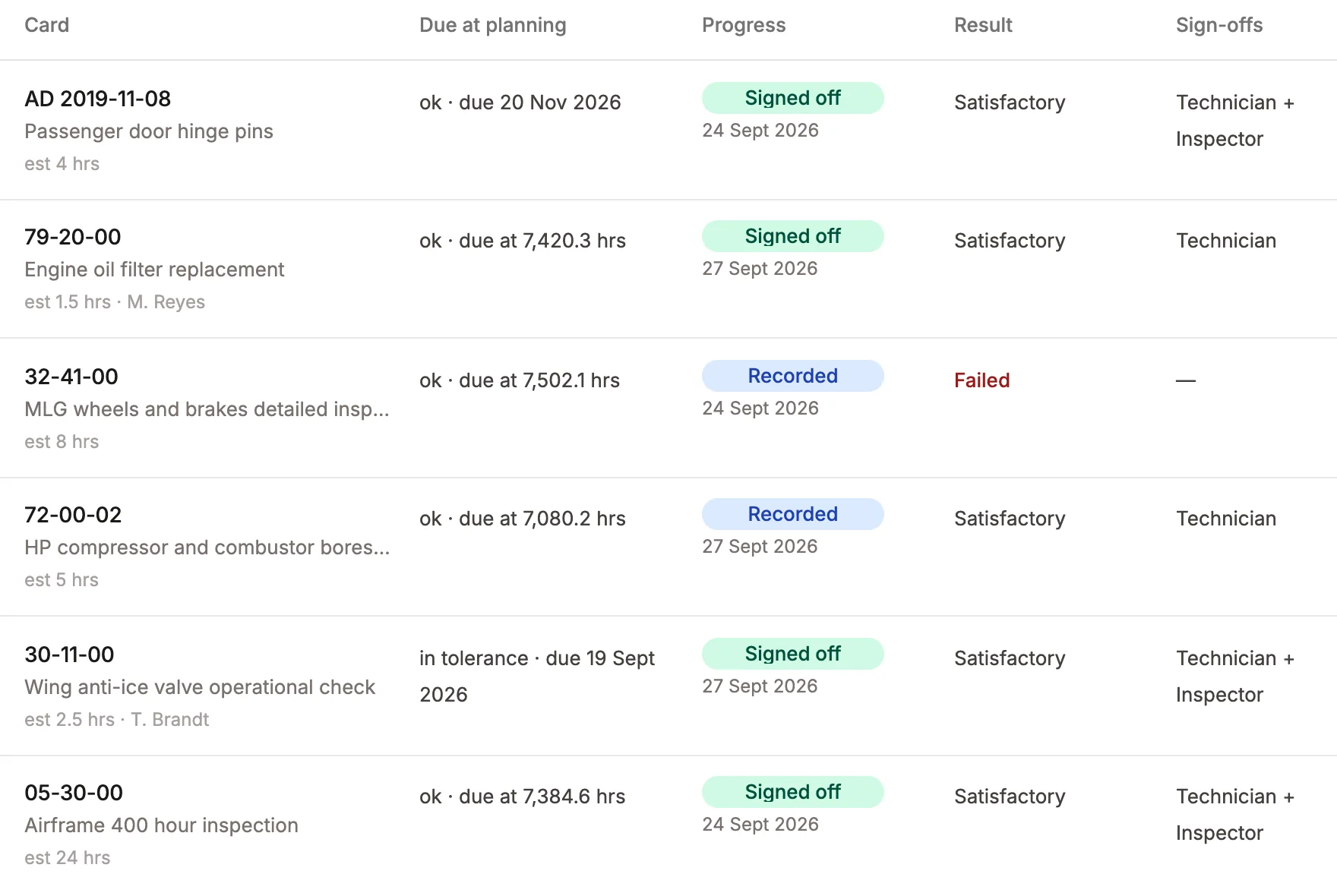
The work plan. Each task with its result and who signed it.
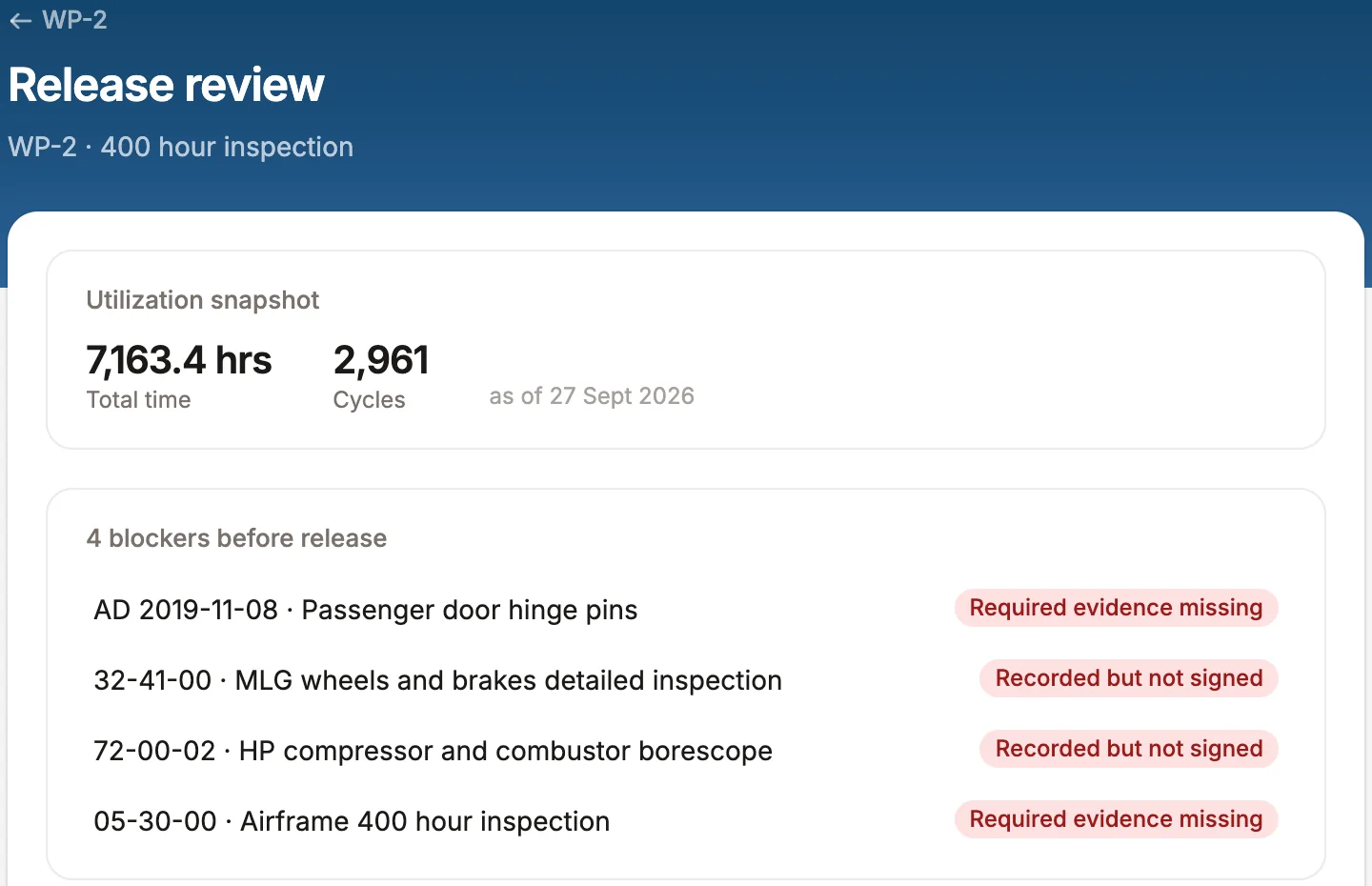
The release review. Stopped by four named items: two unsigned, two with a document missing.
Run both
Keep your current tracker while you try it.
Import your Traxxall status report into Radar's maintenance tracking and run both side by side until you're ready to switch. Add the digital logbook and each line opens its page.
Your Traxxall status report
STATUS REPORTN724RD · CL-350 · S/N 20999
28 SEP 2026
ATADESCRIPTIONLAST C/WNEXT DUEREM
05-20-00A/F 12 MO INSPECTION02 AUG 202602 AUG 2027308 D
33-51-00EMERG LT BATTERY PACKS (AD)02 AUG 202602 AUG 2027308 D
49-10-00APU 12 MO INSPECTION03 MAR 202603 MAR 2027156 D
34-11-00PITOT STATIC LEAK CHECK02 AUG 202602 AUG 2028674 D
32-31-00MLG RETRACT ACTR O/H11 APR 201911 APR 2029926 D
35-20-00CREW O2 CYL HYDRO TEST (AD)09 MAY 202309 MAY 2028589 D
Page 1 of 9
The same lines in Radar, with their logbook pages
N724RDDue list · Challenger 350
6of 6 lines imported
Airframe 12 month inspectionLast 02 Aug 2026 · next 02 Aug 2027
p. 61
Emergency light battery packsLast 02 Aug 2026 · next 02 Aug 2027
p. 3
APU 12 month inspectionLast 03 Mar 2026 · next 03 Mar 2027
p. 9
Pitot-static leak checkLast 02 Aug 2026 · next 02 Aug 2028
Crew oxygen cylinder hydro testLast 09 May 2023 · next 09 May 2028
p. 3
05-20-00 · A/F 12 MO INSPECTION
33-51-00 · EMERG LT BATTERY PACKS (AD)
49-10-00 · APU 12 MO INSPECTION
34-11-00 · PITOT STATIC LEAK CHECK
32-31-00 · MLG RETRACT ACTR O/H
35-20-00 · CREW O2 CYL HYDRO TEST (AD)
Run both side by side. Switch when you're ready.
Six lines from a Traxxall status report move one at a time into Radar's status for the same sample aircraft, and each lands with the logbook page it was read from.
On CAMP? Keep it, and add the digital logbook to the tracker you have.
02 · Records
Prove what's done.
Ship the binders or upload PDFs. Radar reads every page back to birth, so any entry is one search away.
N724RD, back to birthEvery entry filed by logbook and date
Airframe5 books
Engine 13 books
Engine 23 books
APU2 books
AD record1 book
2014 · delivery201620182020202220242026Today
08 Sep 2025 #7 fuel nozzle, with its 8130-3
N724RD Challenger 350 · sample aircraft
Books read0 of 14
Entries filed0
Every page, filed on the aircraft’s life by logbook, from delivery to today.
Prepaid label
About two weeks
PDFAirframe log, book 5.pdf
PDFEngine 2 log, book 3.pdf
PDFAPU log, book 2.pdf
ENGINE
MODULE
SERIAL NUMBER P-137412
SERVICE RECORD
DESCRIPTION OF INSPECTIONS, REPAIRS AND OVERHAULS
ENDORSE ALL INSPECTIONS AND REPAIRS WITH NAME, RATING AND CERTIFICATE NUMBER.
Complied with 400 hour engine inspection I/A/W HTF7000 EMM 05-20-00.
Performed special detailed inspection of engine fault data. No faults recorded.
I Certify that this Inspection has been accomplished in accordance with the Radar Flight Operations LLC Continuous Airworthiness Maintenance Inspection Program under FAR 135.411 (a)(2) and 91.409(f)(1) and the aircraft/engine/appliance is approved for return to service.
Removed and replaced #1 igniter plug P/N 3070118-2. Serial number off: IG-2213, on: IG-4098.
Operational check good.
I Certify that this Inspection has been accomplished in accordance with the Radar Flight Operations LLC Continuous Airworthiness Maintenance Inspection Program under FAR 135.411 (a)(2) and 91.409(f)(1) and the aircraft/engine/appliance is approved for return to service.
Complied with 600 hour engine inspection I/A/W HTF7000 EMM 05-20-00.
Borescope inspection of HP compressor and combustor performed. All findings within limits.
I Certify that this Inspection has been accomplished in accordance with the Radar Flight Operations LLC Continuous Airworthiness Maintenance Inspection Program under FAR 135.411 (a)(2) and 91.409(f)(1) and the aircraft/engine/appliance is approved for return to service.
Replaced engine oil filter element P/N 3074521-1. Inspected magnetic chip detector, no particles found.
I Certify that this Inspection has been accomplished in accordance with the Radar Flight Operations LLC Continuous Airworthiness Maintenance Inspection Program under FAR 135.411 (a)(2) and 91.409(f)(1) and the aircraft/engine/appliance is approved for return to service.
SB HTF7000-72-7009 Rev 2 dated Nov 3, 2017 incorporated. Complied with paragraph C(2), EEI download performed and verified.
I Certify that this Inspection has been accomplished in accordance with the Radar Flight Operations LLC Continuous Airworthiness Maintenance Inspection Program under FAR 135.411 (a)(2) and 91.409(f)(1) and the aircraft/engine/appliance is approved for return to service.
2021-06-11EMERGENCY LIGHTING BATTERY PACKS, FUNCTIONAL CHECKFUNCTIONAL CHECK OF ALL PACKS I/A/W AMM 33-51-00 (SEE AIRFRAME LOG BOOK 5 P. 61)RECURRING 12 MO02/AUG/2026 TT 5,902.702/AUG/2027J. Okafor A&P 45•11 IA
2022-13-04CREW OXYGEN CYLINDER, HYDROSTATIC TESTCYLINDER HYDROSTATIC TEST COMPLIED WITH, RETEST DATE STAMPED ON CYLINDER.RECURRING 5 YR09/MAY/2023 TT 4,118.609/MAY/2028D. Lindqvist A&P 51•04 IA
2024-02-17HTF7000 SERIES FUEL MANIFOLD, INSPECTIONINSPECTED BOTH ENGINE FUEL MANIFOLDS I/A/W HONEYWELL SB HTF7000-73-7012.RECURRING 600 HR14/MAR/2025 ENG 1 TSN 6,236.0 / ENG 2 TSN 4,512.9ENG 1 6,836.0 / ENG 2 5,112.9D. Lindqvist A&P 51•04 IA
2025-09-02CABIN PRESSURE SAFETY VALVE, FUNCTIONAL TESTFUNCTIONAL TEST I/A/W AMM 21-31-04. VALVE OPENED WITHIN LIMITS.RECURRING 24 MO02/AUG/2026 TT 5,902.702/AUG/2028J. Okafor A&P 45•11 IA
Form ADCR-2 Rev. CContinued on page 4
Sample record for illustration
LOGBOOK ENTRY ENGINE 2
Crestline Aero Repair 800 Sample Way, Suite 2 Tulsa, OK 74115 (918) 555-0172 qa@crestlineaero.example
Aircraft Registration NumberN724RD
ManufacturerHONEYWELL
ModelHTF7350
Serial NumberP-137418
Aircraft Hours5410.9
Aircraft Landings3474
Component Hours4779.5
Component Cycles3388
1. 73-11-03-401 REMOVED AND REPLACED #7 FUEL NOZZLE - REMOVED THE #7 FUEL NOZZLE AND INSTALLED A SERVICEABLE FUEL NOZZLE I/A/W HTF7000 EMM 73-11-03. PERFORMED IDLE LEAK CHECK AND OPERATIONAL CHECK. LEAK CHECK GOOD. NO DEFECTS NOTED AT THIS TIME.
2. 71-00-00-710 ENGINE GROUND RUN - PERFORMED ENGINE GROUND RUN AND LEAK CHECK AFTER MAINTENANCE I/A/W HTF7000 EMM 71-00-00. ALL PARAMETERS WITHIN LIMITS.
PART NAMEREMOVED P/NREMOVED S/NINSTALLED P/NINSTALLED S/N
THE AIRCRAFT AND/OR COMPONENT IDENTIFIED ABOVE WAS REPAIRED, SERVICED AND/OR INSPECTED IN ACCORDANCE WITH CRESTLINE AERO REPAIR GENERAL MAINTENANCE MANUAL, AND MANUFACTURER’S RECOMMENDED INSPECTION PROGRAM AS REQUIRED BY 14 CFR FAR 91.409(f) (3) AND HAS BEEN DETERMINED TO BE IN AIRWORTHY CONDITION AND IS APPROVED FOR RETURN TO SERVICE WITH RESPECT TO THE WORK ACCOMPLISHED. PERTINENT DETAILS OF WORK PERFORMED ARE ON FILE. Pertinent detail of the work scope are found within work order number C2025-188.
Signature
Certificate Type & Number
A&P 38•72
Printed Name
M. REYES
Date
08/SEP/2025
1 of 1
Sample record for illustration
1. Approving Civil Aviation Authority/Country:
FAA/United States
2.
AUTHORIZED RELEASE CERTIFICATE FAA Form 8130-3, AIRWORTHINESS APPROVAL TAG
3. Form Tracking Number:
CAR-8130-40918
4. Organization Name and Address:
CRESTLINE AERO REPAIR FAA CRS C4RA118K 800 Sample Way, Suite 2, Tulsa, OK 74115
5. Work Order/Contract/Invoice Number:
C2025-188
6. Item:
1
7. Description:
FUEL NOZZLE
8. Part Number:
3070912-7
9. Quantity:
1
10. Serial Number:
FN-0C2231
11. Status/Work:
OVERHAULED
12. Remarks:
OVERHAULED I/A/W CMM 73-10-12 REV 9. FLOW TESTED WITHIN LIMITS.
13a. Certifies the items identified above were manufactured in conformity to:
Approved design data and are in a condition for safe operation. Non-approved design data specified in Block 12.
14a.
14 CFR 43.9 Return to Service Other regulation specified in Block 12
Certifies that unless otherwise specified in Block 12, the work identified in Block 11 and described in Block 12 was accomplished in accordance with Title 14, Code of Federal Regulations, part 43 and in respect to that work, the items are approved for return to service.
13b. Authorized Signature:
13c. Approval/Authorization No.:
14b. Authorized Signature:
14c. Approval/Certificate No.:
CRS C4RA118K
13d. Name (Typed or Printed):
13e. Date (dd/mmm/yyyy):
14d. Name (Typed or Printed):
M. Reyes
14e. Date (dd/mmm/yyyy):
05/SEP/2025
User/Installer Responsibilities
It is important to understand that the existence of this document alone does not automatically constitute authority to install the aircraft engine/propeller/article. Where the user/installer performs work in accordance with the national regulations of an airworthiness authority different than the airworthiness authority of the country specified in Block 1, it is essential that the user/installer ensures that his/her airworthiness authority accepts aircraft engine(s)/propeller(s)/article(s) from the airworthiness authority of the country specified in Block 1. Statements in Blocks 13a and 14a do not constitute installation certification. In all cases, aircraft maintenance records must contain an installation certification issued in accordance with the national regulations by the user/installer before the aircraft may be flown.
FAA Form 8130-3 (02-14)NSN: 0052-00-012-9005
Sample record for illustration
Total time5,410.9 hrs · 3,474 landings
Task73-11-03 · #7 fuel nozzle replaced
Part and serial3070912-7 · off FN-0A1182 · on FN-0C2231
Signer and certificateM. Reyes · A&P 38•72
Date08 Sep 2025
FAA 8130-3Fuel nozzle, overhauled · FN-0C2231
Ask Radar
2 entries for serial FN-0C2231
LOGBOOK ENTRY ENGINE 2
Crestline Aero Repair 800 Sample Way, Suite 2 Tulsa, OK 74115 (918) 555-0172 qa@crestlineaero.example
Aircraft Registration NumberN724RD
ManufacturerHONEYWELL
ModelHTF7350
Serial NumberP-137418
Aircraft Hours5410.9
Aircraft Landings3474
Component Hours4779.5
Component Cycles3388
1. 73-11-03-401 REMOVED AND REPLACED #7 FUEL NOZZLE - REMOVED THE #7 FUEL NOZZLE AND INSTALLED A SERVICEABLE FUEL NOZZLE I/A/W HTF7000 EMM 73-11-03. PERFORMED IDLE LEAK CHECK AND OPERATIONAL CHECK. LEAK CHECK GOOD. NO DEFECTS NOTED AT THIS TIME.
2. 71-00-00-710 ENGINE GROUND RUN - PERFORMED ENGINE GROUND RUN AND LEAK CHECK AFTER MAINTENANCE I/A/W HTF7000 EMM 71-00-00. ALL PARAMETERS WITHIN LIMITS.
PART NAMEREMOVED P/NREMOVED S/NINSTALLED P/NINSTALLED S/N
THE AIRCRAFT AND/OR COMPONENT IDENTIFIED ABOVE WAS REPAIRED, SERVICED AND/OR INSPECTED IN ACCORDANCE WITH CRESTLINE AERO REPAIR GENERAL MAINTENANCE MANUAL, AND MANUFACTURER’S RECOMMENDED INSPECTION PROGRAM AS REQUIRED BY 14 CFR FAR 91.409(f) (3) AND HAS BEEN DETERMINED TO BE IN AIRWORTHY CONDITION AND IS APPROVED FOR RETURN TO SERVICE WITH RESPECT TO THE WORK ACCOMPLISHED. PERTINENT DETAILS OF WORK PERFORMED ARE ON FILE. Pertinent detail of the work scope are found within work order number C2025-188.
Signature
Certificate Type & Number
A&P 38•72
Printed Name
M. REYES
Date
08/SEP/2025
1 of 1
Sample record for illustration
#7 fuel nozzle removed and replacedInstalled S/N FN-0C2231 · 08 Sep 2025Engine 2 log, Book 3, p. 17
1. Approving Civil Aviation Authority/Country:
FAA/United States
2.
AUTHORIZED RELEASE CERTIFICATE FAA Form 8130-3, AIRWORTHINESS APPROVAL TAG
3. Form Tracking Number:
CAR-8130-40918
4. Organization Name and Address:
CRESTLINE AERO REPAIR FAA CRS C4RA118K 800 Sample Way, Suite 2, Tulsa, OK 74115
5. Work Order/Contract/Invoice Number:
C2025-188
6. Item:
1
7. Description:
FUEL NOZZLE
8. Part Number:
3070912-7
9. Quantity:
1
10. Serial Number:
FN-0C2231
11. Status/Work:
OVERHAULED
12. Remarks:
OVERHAULED I/A/W CMM 73-10-12 REV 9. FLOW TESTED WITHIN LIMITS.
13a. Certifies the items identified above were manufactured in conformity to:
Approved design data and are in a condition for safe operation. Non-approved design data specified in Block 12.
14a.
14 CFR 43.9 Return to Service Other regulation specified in Block 12
Certifies that unless otherwise specified in Block 12, the work identified in Block 11 and described in Block 12 was accomplished in accordance with Title 14, Code of Federal Regulations, part 43 and in respect to that work, the items are approved for return to service.
13b. Authorized Signature:
13c. Approval/Authorization No.:
14b. Authorized Signature:
14c. Approval/Certificate No.:
CRS C4RA118K
13d. Name (Typed or Printed):
13e. Date (dd/mmm/yyyy):
14d. Name (Typed or Printed):
M. Reyes
14e. Date (dd/mmm/yyyy):
05/SEP/2025
User/Installer Responsibilities
It is important to understand that the existence of this document alone does not automatically constitute authority to install the aircraft engine/propeller/article. Where the user/installer performs work in accordance with the national regulations of an airworthiness authority different than the airworthiness authority of the country specified in Block 1, it is essential that the user/installer ensures that his/her airworthiness authority accepts aircraft engine(s)/propeller(s)/article(s) from the airworthiness authority of the country specified in Block 1. Statements in Blocks 13a and 14a do not constitute installation certification. In all cases, aircraft maintenance records must contain an installation certification issued in accordance with the national regulations by the user/installer before the aircraft may be flown.
FAA Form 8130-3 (02-14)NSN: 0052-00-012-9005
Sample record for illustration
FAA 8130-3 · fuel nozzle, overhauledS/N FN-0C2231 · 05 Sep 2025Filed with the entry
3 March 2026, at 2,977.6 APU hours, by Crestline Aero Repair. Signed by M. Reyes.
APU log, Book 2, p. 9
LOGBOOK ENTRY APU
Crestline Aero Repair 800 Sample Way, Suite 2 Tulsa, OK 74115 (918) 555-0172 qa@crestlineaero.example
Aircraft Registration NumberN724RD
ManufacturerHONEYWELL
Model36-150(BD)
Serial NumberP-A2291
Aircraft Hours5712.8
Aircraft Landings3655
Component Hours2977.6
Component CyclesN/A
1. 49-10-00-210 APU 12 MONTH INSPECTION - COMPLIED WITH THE 12 MONTH INSPECTION TASKS I/A/W HONEYWELL 36-150 MM 49-10-00. NO DEFECTS NOTED AT THIS TIME.
2. 49-18-00-201 VISUAL CHECK OF THE APU DRAINS - PERFORMED VISUAL CHECK OF THE APU DRAINS I/A/W BD-100 AMM 49-18-00. NO DEFECTS NOTED AT THIS TIME.
3. 49-91-05-201 DETAILED INSPECTION OF THE APU MAGNETIC CHIP DETECTOR - PERFORMED DETAILED INSPECTION OF THE APU MAGNETIC CHIP DETECTOR I/A/W BD-100 AMM 49-91-05. NO DEFECTS NOTED AT THIS TIME.
4. 49-31-00-201 VISUAL INSPECTION OF THE APU FUEL FILTER DIFFERENTIAL-PRESSURE-INDICATOR - PERFORMED VISUAL INSPECTION OF THE APU FUEL FILTER DPI I/A/W BD-100 AMM 49-31-00. NO DEFECTS NOTED AT THIS TIME.
5. 53-51-00-201 GENERAL VISUAL INSPECTION OF THE APU ENCLOSURE DRAIN - PERFORMED GENERAL VISUAL INSPECTION OF THE APU ENCLOSURE DRAINS I/A/W BD-100 AMM 52-51-00. NO DEFECTS NOTED AT THIS TIME.
PART NAMEREMOVED P/NREMOVED S/NINSTALLED P/NINSTALLED S/N
THE AIRCRAFT AND/OR COMPONENT IDENTIFIED ABOVE WAS REPAIRED, SERVICED AND/OR INSPECTED IN ACCORDANCE WITH CRESTLINE AERO REPAIR GENERAL MAINTENANCE MANUAL, AND MANUFACTURER’S RECOMMENDED INSPECTION PROGRAM AS REQUIRED BY 14 CFR FAR 91.409(f) (3) AND HAS BEEN DETERMINED TO BE IN AIRWORTHY CONDITION AND IS APPROVED FOR RETURN TO SERVICE WITH RESPECT TO THE WORK ACCOMPLISHED. PERTINENT DETAILS OF WORK PERFORMED ARE ON FILE. Pertinent detail of the work scope are found within work order number C2026-031.
Signature
Certificate Type & Number
A&P 38•72
Printed Name
M. REYES
Date
03/MAR/2026
1 of 1
Sample record for illustration
What Radar reads from every page
Typed or handwritten, back to birth. Each value is linked to the spot on the page it came from.
LOGBOOK ENTRY ENGINE 2
Crestline Aero Repair 800 Sample Way, Suite 2 Tulsa, OK 74115 (918) 555-0172 qa@crestlineaero.example
Aircraft Registration NumberN724RD
ManufacturerHONEYWELL
ModelHTF7350
Serial NumberP-137418
Aircraft Hours5410.9
Aircraft Landings3474
Component Hours4779.5
Component Cycles3388
1. 73-11-03-401 REMOVED AND REPLACED #7 FUEL NOZZLE - REMOVED THE #7 FUEL NOZZLE AND INSTALLED A SERVICEABLE FUEL NOZZLE I/A/W HTF7000 EMM 73-11-03. PERFORMED IDLE LEAK CHECK AND OPERATIONAL CHECK. LEAK CHECK GOOD. NO DEFECTS NOTED AT THIS TIME.
2. 71-00-00-710 ENGINE GROUND RUN - PERFORMED ENGINE GROUND RUN AND LEAK CHECK AFTER MAINTENANCE I/A/W HTF7000 EMM 71-00-00. ALL PARAMETERS WITHIN LIMITS.
PART NAMEREMOVED P/NREMOVED S/NINSTALLED P/NINSTALLED S/N
THE AIRCRAFT AND/OR COMPONENT IDENTIFIED ABOVE WAS REPAIRED, SERVICED AND/OR INSPECTED IN ACCORDANCE WITH CRESTLINE AERO REPAIR GENERAL MAINTENANCE MANUAL, AND MANUFACTURER’S RECOMMENDED INSPECTION PROGRAM AS REQUIRED BY 14 CFR FAR 91.409(f) (3) AND HAS BEEN DETERMINED TO BE IN AIRWORTHY CONDITION AND IS APPROVED FOR RETURN TO SERVICE WITH RESPECT TO THE WORK ACCOMPLISHED. PERTINENT DETAILS OF WORK PERFORMED ARE ON FILE. Pertinent detail of the work scope are found within work order number C2025-188.
Signature
Certificate Type & Number
A&P 38•72
Printed Name
M. REYES
Date
08/SEP/2025
1 of 1
Sample record for illustration
1. Approving Civil Aviation Authority/Country:
FAA/United States
2.
AUTHORIZED RELEASE CERTIFICATE FAA Form 8130-3, AIRWORTHINESS APPROVAL TAG
3. Form Tracking Number:
CAR-8130-40918
4. Organization Name and Address:
CRESTLINE AERO REPAIR FAA CRS C4RA118K 800 Sample Way, Suite 2, Tulsa, OK 74115
5. Work Order/Contract/Invoice Number:
C2025-188
6. Item:
1
7. Description:
FUEL NOZZLE
8. Part Number:
3070912-7
9. Quantity:
1
10. Serial Number:
FN-0C2231
11. Status/Work:
OVERHAULED
12. Remarks:
OVERHAULED I/A/W CMM 73-10-12 REV 9. FLOW TESTED WITHIN LIMITS.
13a. Certifies the items identified above were manufactured in conformity to:
Approved design data and are in a condition for safe operation. Non-approved design data specified in Block 12.
14a.
14 CFR 43.9 Return to Service Other regulation specified in Block 12
Certifies that unless otherwise specified in Block 12, the work identified in Block 11 and described in Block 12 was accomplished in accordance with Title 14, Code of Federal Regulations, part 43 and in respect to that work, the items are approved for return to service.
13b. Authorized Signature:
13c. Approval/Authorization No.:
14b. Authorized Signature:
14c. Approval/Certificate No.:
CRS C4RA118K
13d. Name (Typed or Printed):
13e. Date (dd/mmm/yyyy):
14d. Name (Typed or Printed):
M. Reyes
14e. Date (dd/mmm/yyyy):
05/SEP/2025
User/Installer Responsibilities
It is important to understand that the existence of this document alone does not automatically constitute authority to install the aircraft engine/propeller/article. Where the user/installer performs work in accordance with the national regulations of an airworthiness authority different than the airworthiness authority of the country specified in Block 1, it is essential that the user/installer ensures that his/her airworthiness authority accepts aircraft engine(s)/propeller(s)/article(s) from the airworthiness authority of the country specified in Block 1. Statements in Blocks 13a and 14a do not constitute installation certification. In all cases, aircraft maintenance records must contain an installation certification issued in accordance with the national regulations by the user/installer before the aircraft may be flown.
FAA Form 8130-3 (02-14)NSN: 0052-00-012-9005
Sample record for illustration
123456Engine 2 log, Book 3, p. 17 · sample aircraft
1
Times and cyclesAircraft 5,410.9 hrs · 3,474 landingsEngine 2 at 4,779.5 hrs and 3,388 cycles
2
The work done73-11-03 · #7 fuel nozzle replacedWith the leak check and the ground run
3
Parts off and onPart number 3070912-7Serial off FN-0A1182 · serial on FN-0C2231
4
Return to serviceWork order C2025-188The shop’s release statement, word for word
5
Who signed, and whenM. Reyes · A&P 38•72Signed 08 Sep 2025
6
The 8130-3 tagFuel nozzle, overhauledFiled with the entry it belongs to
Live records
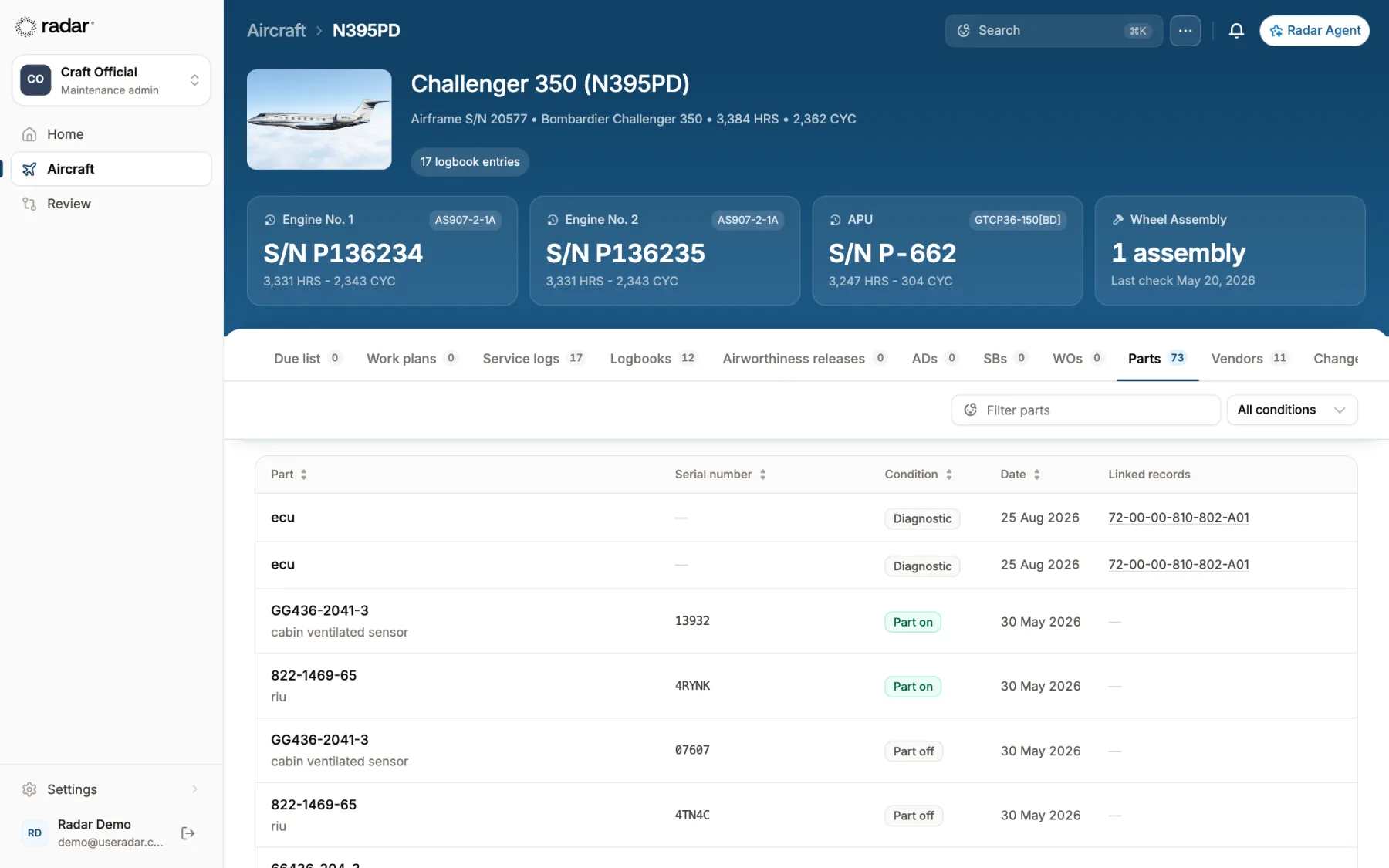
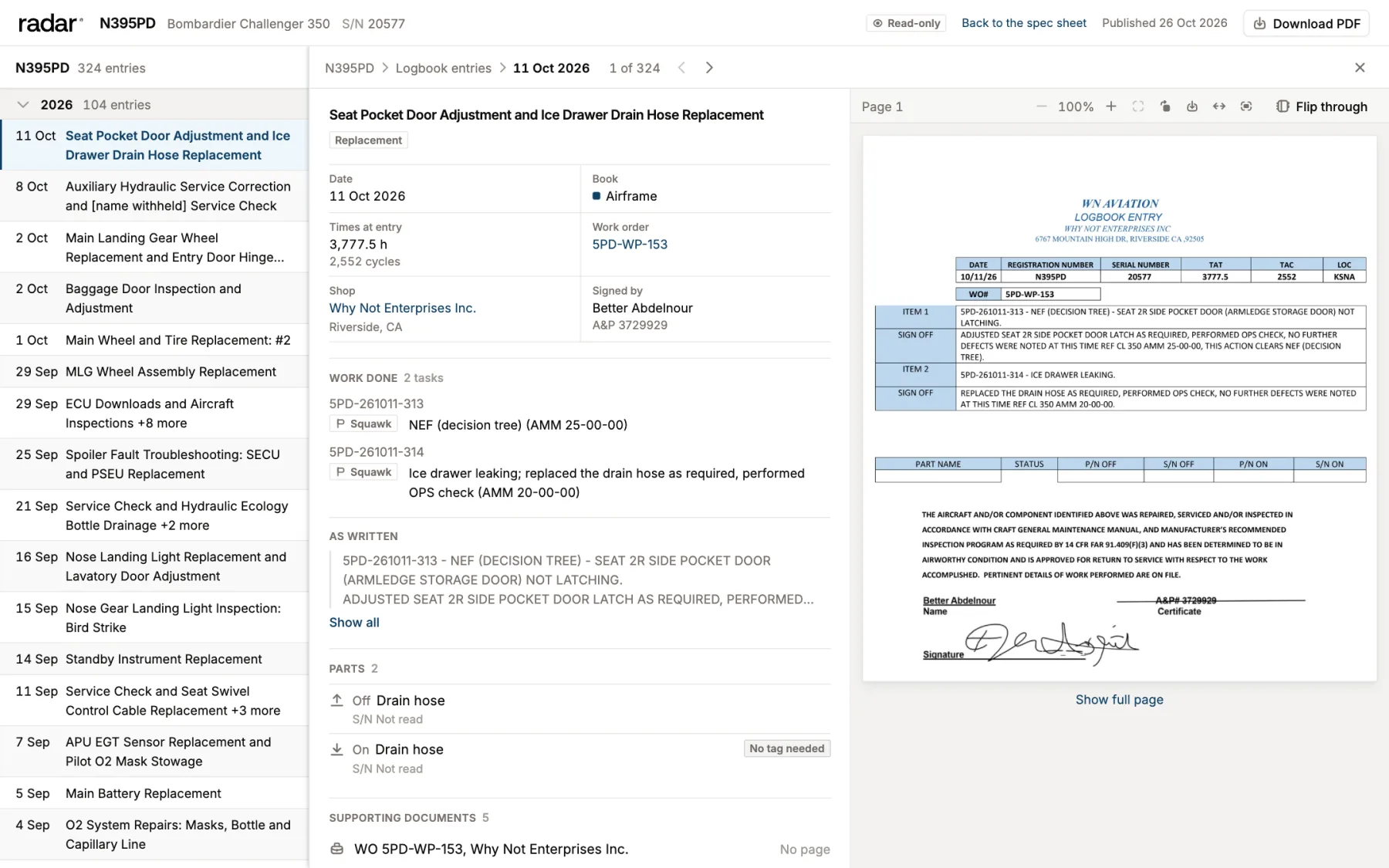
A real Challenger 350, every entry read.
This is the Radar app, read-only. Every logbook entry from 2015 to today, filed by book, each one beside
the signed page it came from. Click any entry.
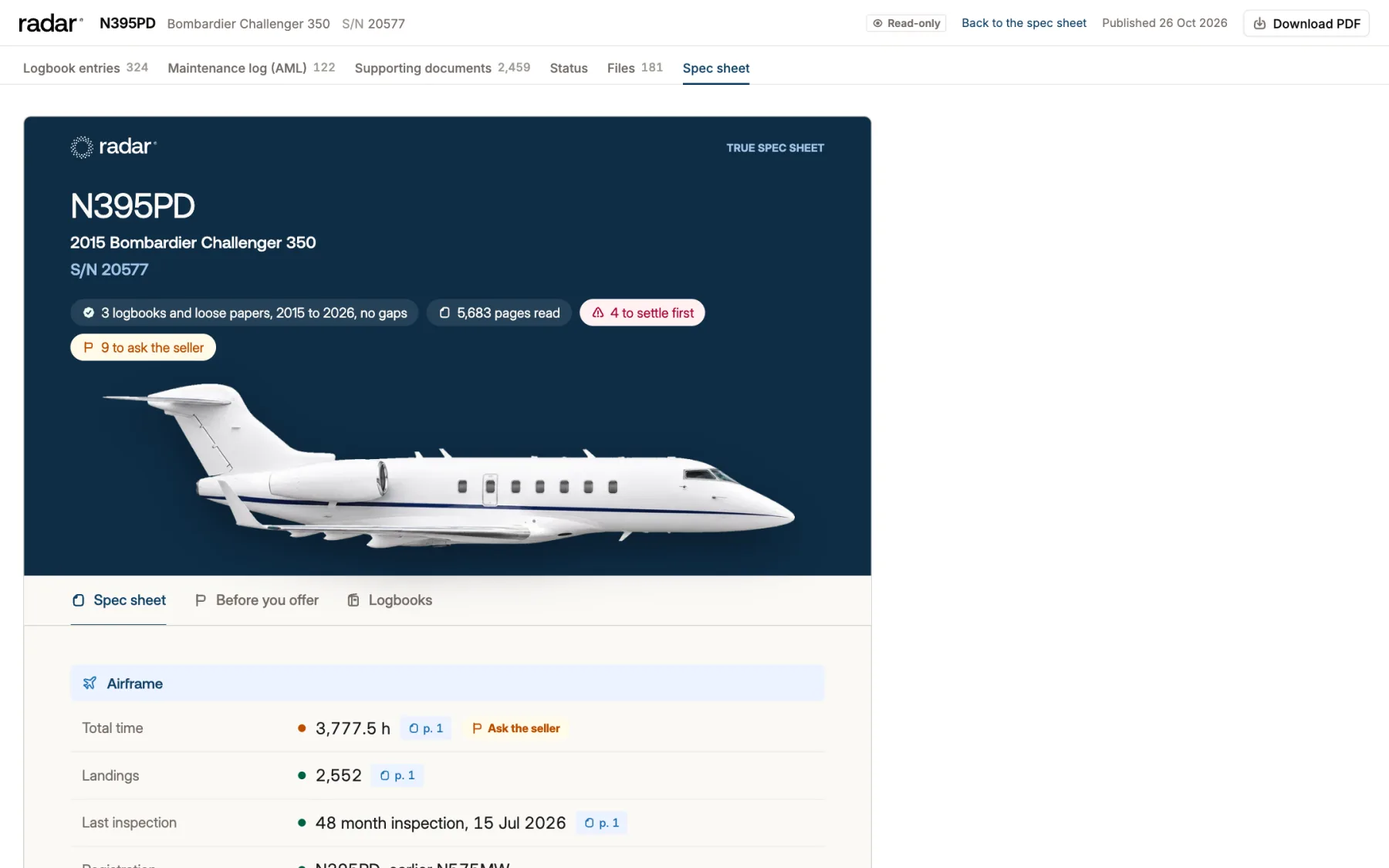
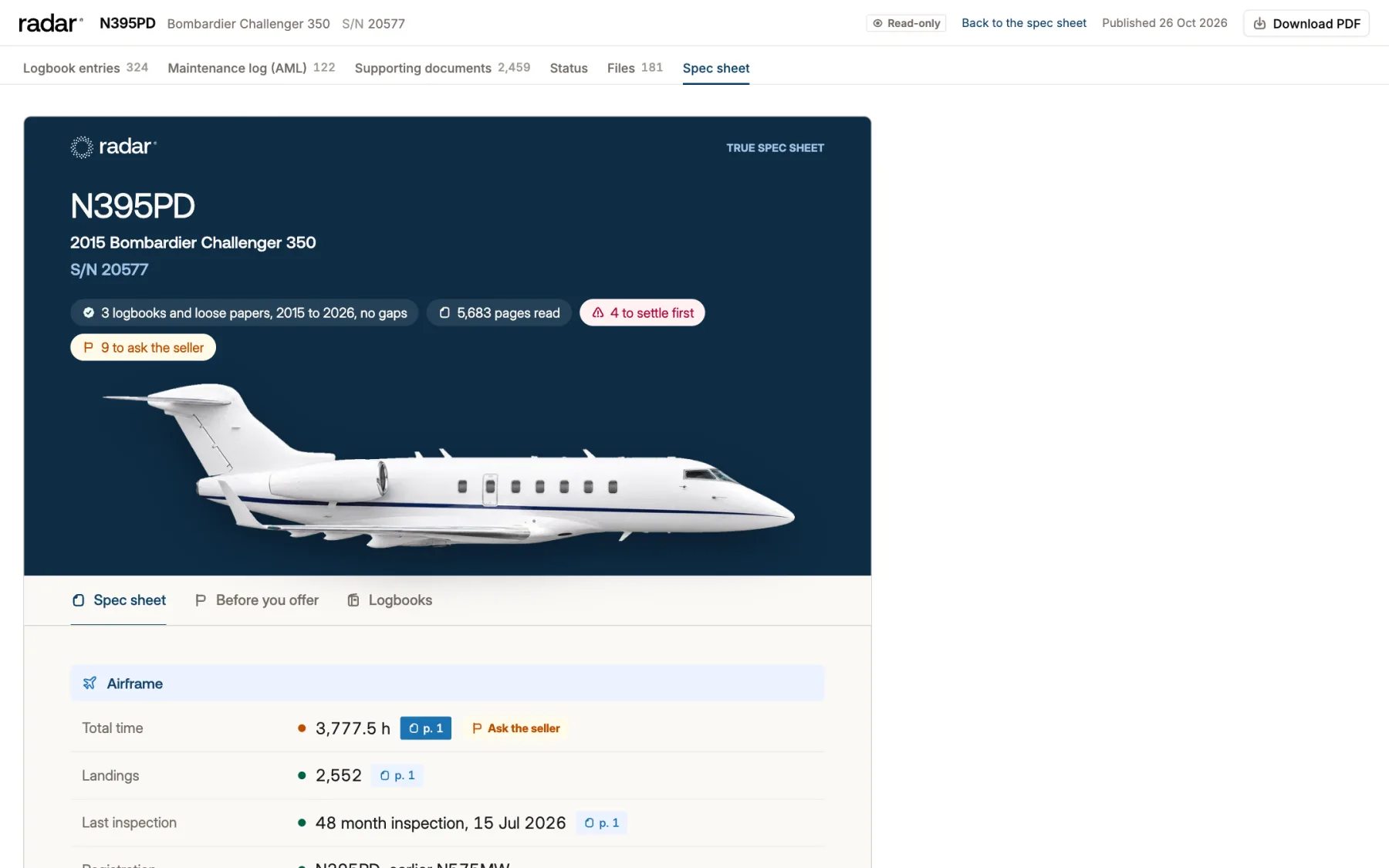
The True Spec Sheet reads every page of the logbooks, so the records review can start before the offer.
Buyers go into the inspection knowing what to check. Sellers find the gaps first.
1
Send the PDFs, or we scan near the hangar
Forward the logbooks you have. Paper only? A scanning partner near the hangar captures every book.
2
Every value names its page
Times, engines by serial, inspections, ADs and damage, each linked to the signed logbook page. What the books do not show says so.
3
What to settle before the offer
Gaps and open items come flagged, with the question for the seller and a closing checklist from LOI to records transfer.
Maintenance Tracking sets up from your maintenance programs or your Traxxall status report. Records starts when you ship the binders with our prepaid labels or upload PDFs, and they are ready in about two weeks.
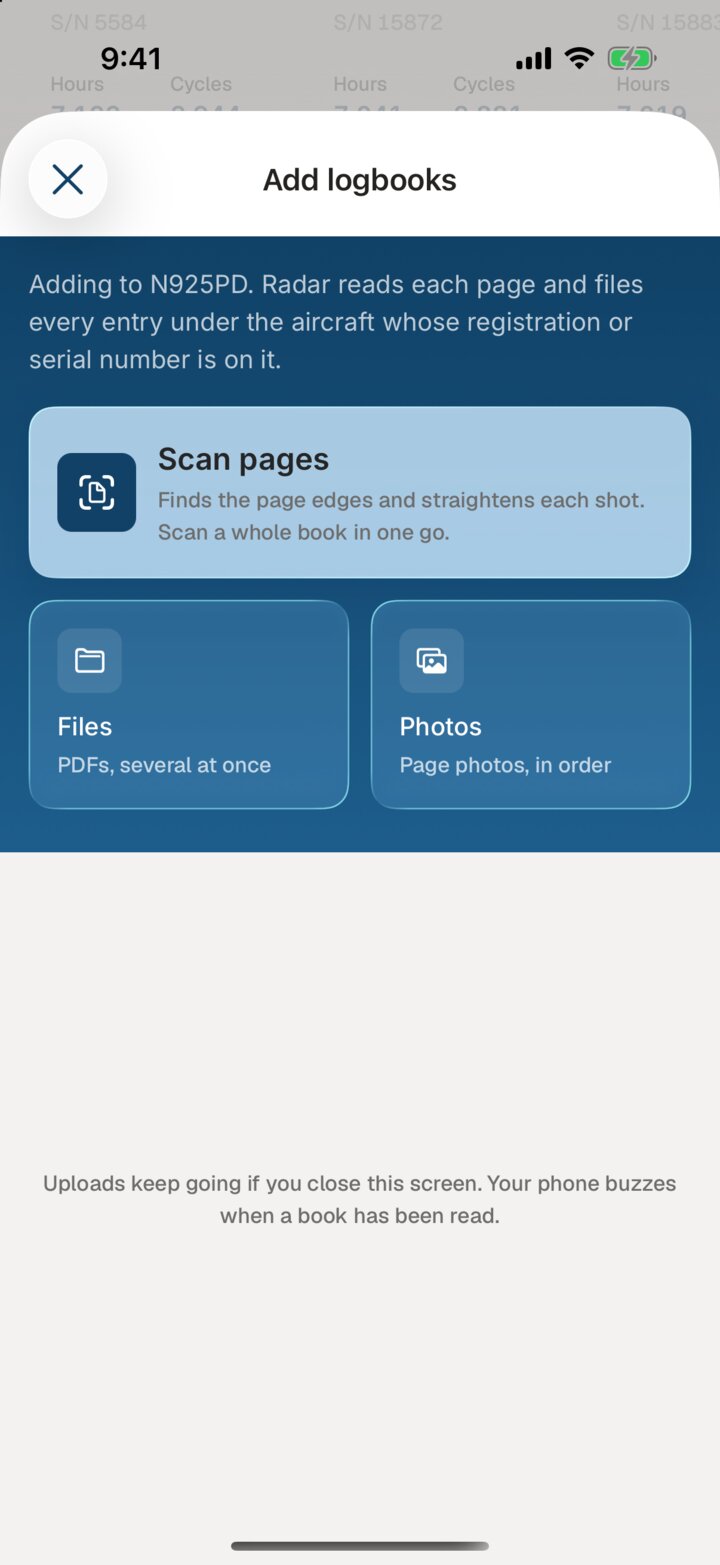
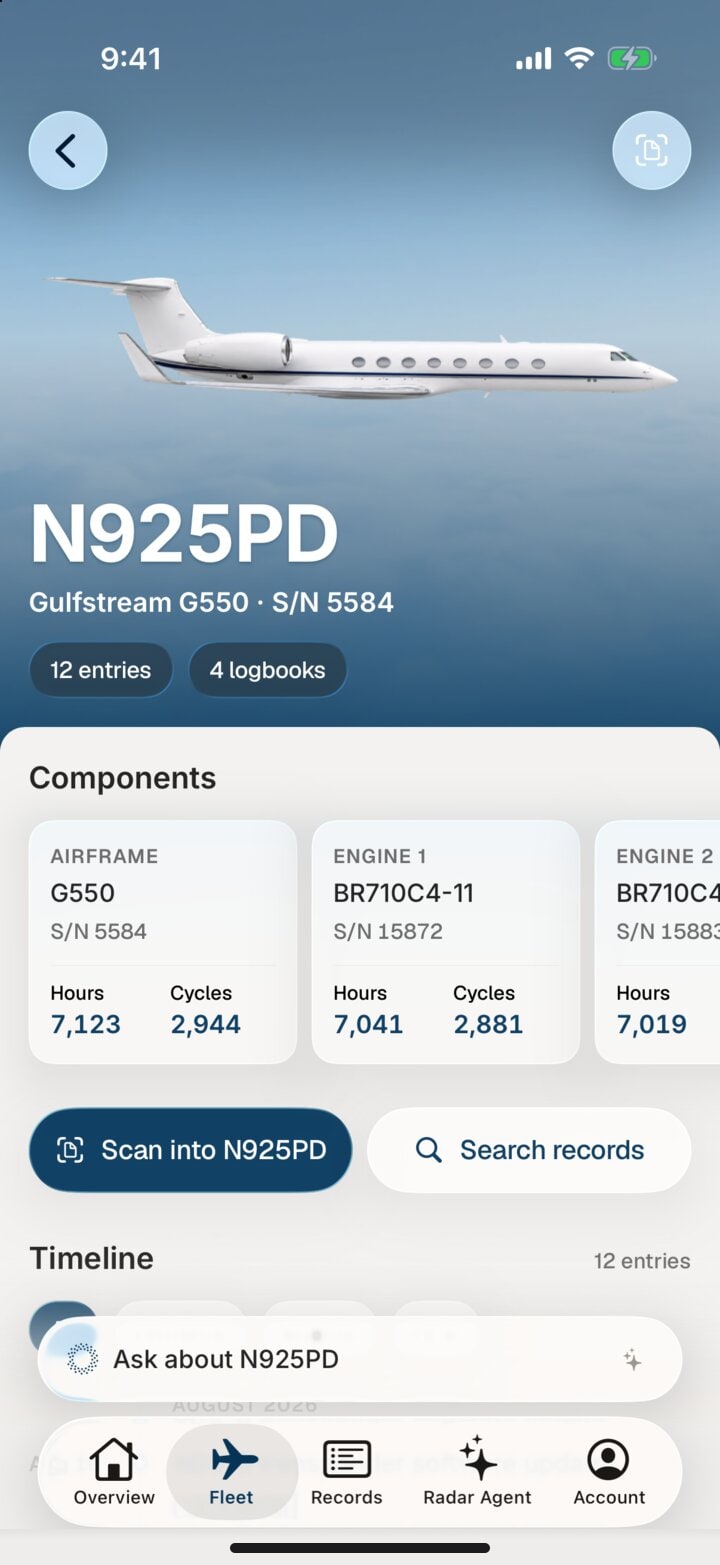
You are rarely standing next to the aircraft. From wherever you are, find any entry by part or serial number, ask Radar about it, and show anyone the page it came from. Your team on the ramp can scan new pages straight into the record.
Scan a whole logbook in one go
Every aircraft with its hours, cycles and logbooks
Ask Radar about any entry
Real iPhone app screens with a sample aircraft.
Two iPhone app screens: adding logbooks to an aircraft by scanning pages or uploading files, and an aircraft page for sample tail N925PD with its components, hours and cycles.




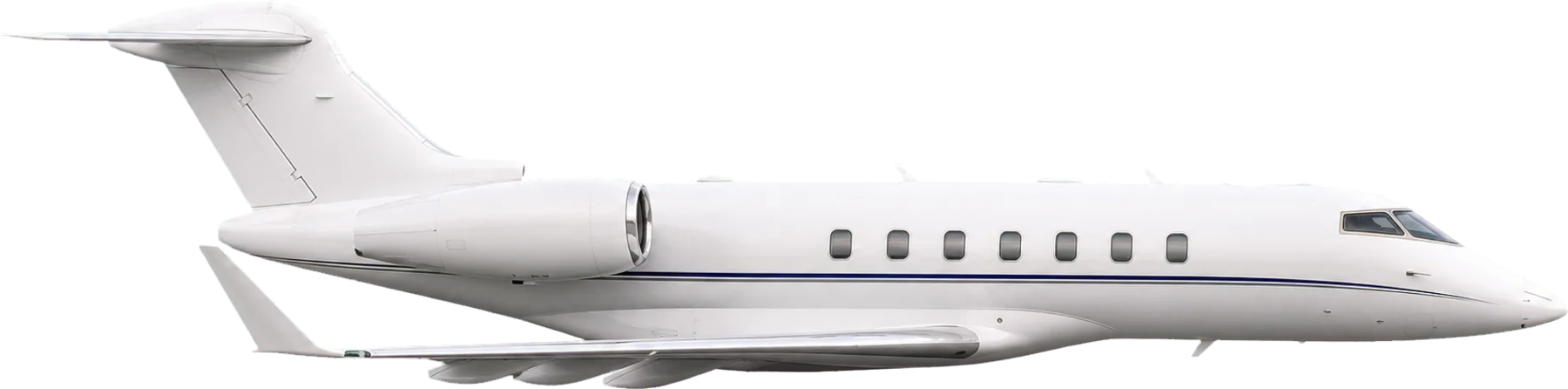 Bombardier Challenger 300
 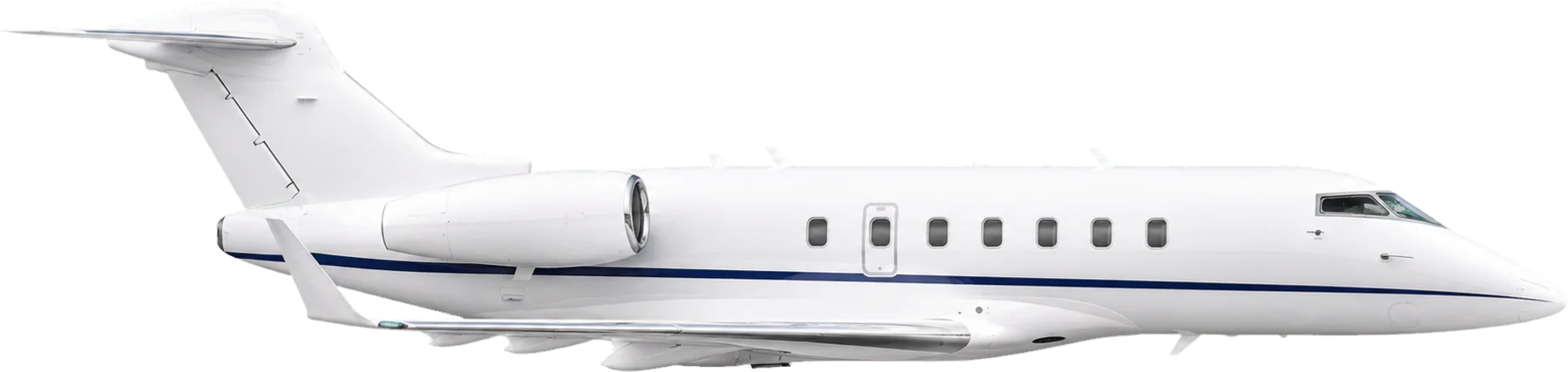 Bombardier Challenger 350
  Gulfstream G280
  Cessna Citation X
  Cessna Citation Longitude
  Gulfstream G200